Canopy Security · UX Design & Research
Reducing Alert Fatigue with Snooze Monitoring
What happens when your security app won't stop crying wolf? Users stop listening — and that's the real threat.
Role
Product Designer & Researcher
Platform
iOS & Android
Timeline
~5 weeks
Tools
Figma, LogRocket, Zendesk, Jira, Google Meet
The Problem
Users weren't ignoring their security system. Their security system trained them to.
Canopy is built around real-time monitoring — the promise that something is always watching your vehicle and its surroundings. But that promise breaks down fast when users are flooded with alerts every time their dog walks past the driveway, or every time they reach into their own truck bed. The system had no concept of context. It couldn't tell the difference between a real threat and an owner going about their day.
The result was a classic alert fatigue loop: too many notifications, too many false positives, and eventually users disabling notifications entirely — or worse, the app itself. For a security product, that's the worst possible outcome. We weren't just annoying people. We were undermining the core reason they bought the product.
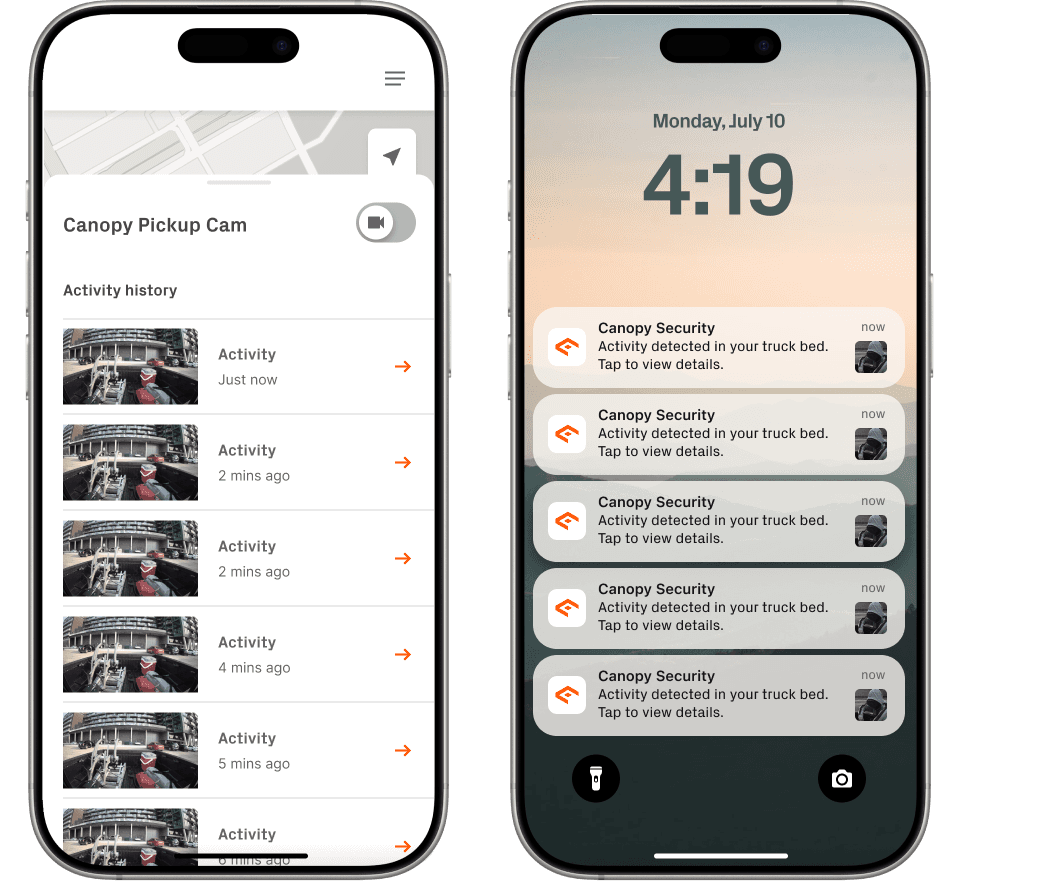
The before state: a cluttered activity history full of repetitive, low-value alerts alongside a lock screen flooded with identical push notifications. Users had no way to pause monitoring — only turn it off entirely.
Discovery
Users weren't asking for fewer alerts. They were asking for smarter ones.
Before exploring solutions, I went back to the source — LogRocket session recordings, Zendesk support tickets, and 8 user interviews conducted over Google Meet with people actively experiencing alert fatigue. The pattern that surfaced wasn't what I expected. Users weren't frustrated with Canopy's monitoring capabilities. They were frustrated that the system couldn't tell when to stand down.
Research Question
How might we reduce alert fatigue without undermining the security value of the app?
"I get nonstop alerts, and every time I check, it's just my dog walking by. It's gotten to the point where I ignore them all — or just shut it off."
— Canopy user
"I was doing some work on my truck and couldn't figure out how to stop the alerts without disabling everything. I just put my phone on silent."
— Canopy user
"My kids play in the driveway after school every day. I know it's them, but the app doesn't. I've basically given up on checking notifications."
— Canopy user
"I had a work meeting and my phone kept buzzing. I couldn't turn it off without going into settings and fumbling around. There should just be a pause button."
— Canopy user
Key Insights
Three things I learned that shaped everything.
01
Pause, don't disable
Users weren't trying to turn off their security. They wanted to pause it briefly during expected activity — and have it come back on automatically. The concept of 'snooze' was already intuitive to them.
This meant the feature had to be explicitly temporary — automatic resumption was non-negotiable.
02
Context over duration
Time-based options alone weren't enough. Users thought in terms of what they were doing — 'I'm next to my car,' 'kids are outside' — not how many minutes they wanted silence.
The feature needed contextual presets, not just a timer. Users speak in situations, not minutes.
03
Visibility of snooze state
Users had no way to tell if monitoring was active or paused at a glance. Surfacing snooze status clearly — especially on the device page — was just as important as the snooze feature itself.
Status had to be visible without the user opening the monitoring menu. Passive, always-on reassurance.
The Reframe
I thought it was a notification problem. It was actually a control problem.
Early on I framed this as a volume problem — too many notifications, reduce the count. But the research kept pointing somewhere else. The issue wasn't how many alerts users received. It was that they had no agency over when those alerts happened. Every notification was on the system's terms, not theirs. That felt disrespectful, especially in a product where trust is everything.
That reframe changed what I was designing entirely. The goal wasn't to reduce notifications — it was to give users meaningful, contextual control over their monitoring experience. Done right, a snooze feature wouldn't make Canopy feel less secure. It would make it feel like it actually understood how people live.
Inspiration
Apple already solved this. I just needed to apply it.
The mental model users already had was Apple's Do Not Disturb — duration-based, contextual, and reversible. They understood "for 1 hour" and "until I leave this location" without needing an explanation. That gave me a clear design direction: build something that felt that intuitive, but mapped to Canopy-specific situations like being near your vehicle or knowing your kids are outside.
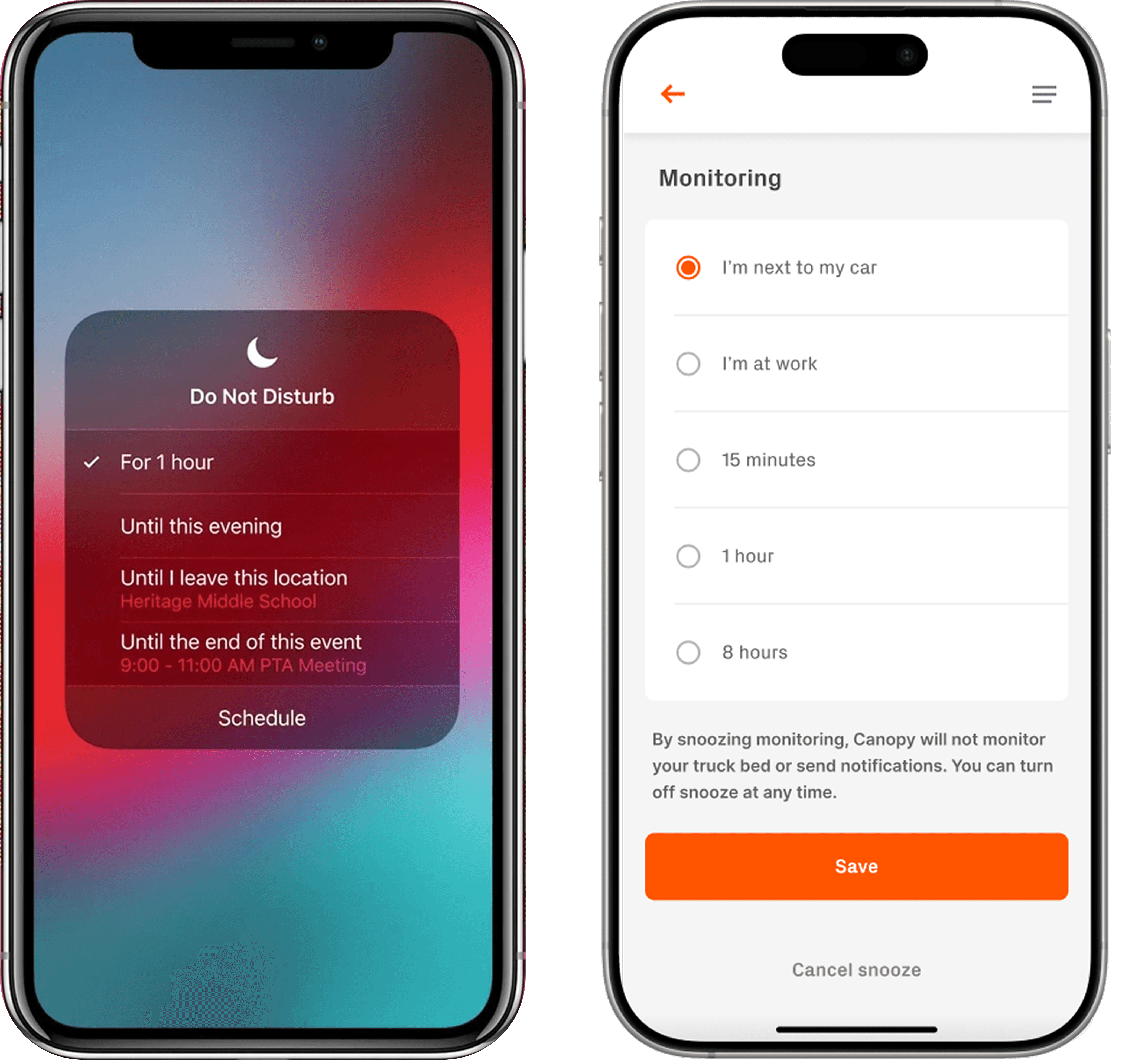
Left: Apple's Do Not Disturb — the mental model users already understood. Right: my initial Snooze Monitoring design, mapping that same logic to Canopy's context.
Design Iteration
The right solution only became clear by building the wrong ones first.
I ran six prototype iterations before landing on the final design. Each round surfaced a different gap — copy clarity, interaction pattern, scope, and ultimately the missing piece that made the whole feature trustworthy: visible snooze state on the device page.
Artifact — Prototype iterations
Six prototypes. One direction.
Test the full snooze flow end to end
Partially adoptedComplete flow from device page through confirmation and active state. Focused on whether users understood what 'snooze' meant in a security context.
Simplify — reduce the number of steps
AbandonedStripped the flow to its minimum: one tap to snooze, no duration selection, no confirmation. Faster but blunter.
Explore toggle vs. button vs. segmented control for activation
AbandonedThree interaction patterns for initiating snooze — a toggle, a primary button, and a segmented control with preset options.
Map full edge cases — multi-device, device asleep, manual resume
Partially adoptedComprehensive flow covering all states including zone-by-zone snoozing across multiple Canopy devices and the 'device is asleep' edge case.
Right-sized flow — confirm + duration, nothing else
Key insightCore flow with confirmation step and contextual duration presets. Clean and fast but missing something after the user confirmed.
Surface active snooze state on the device page
ShippedAdded 'Snoozing until user resumes' indicator directly to the device page so snooze status is visible without opening the monitoring menu.
The Solution
One tap to quiet the noise. Automatic resume when it's over.
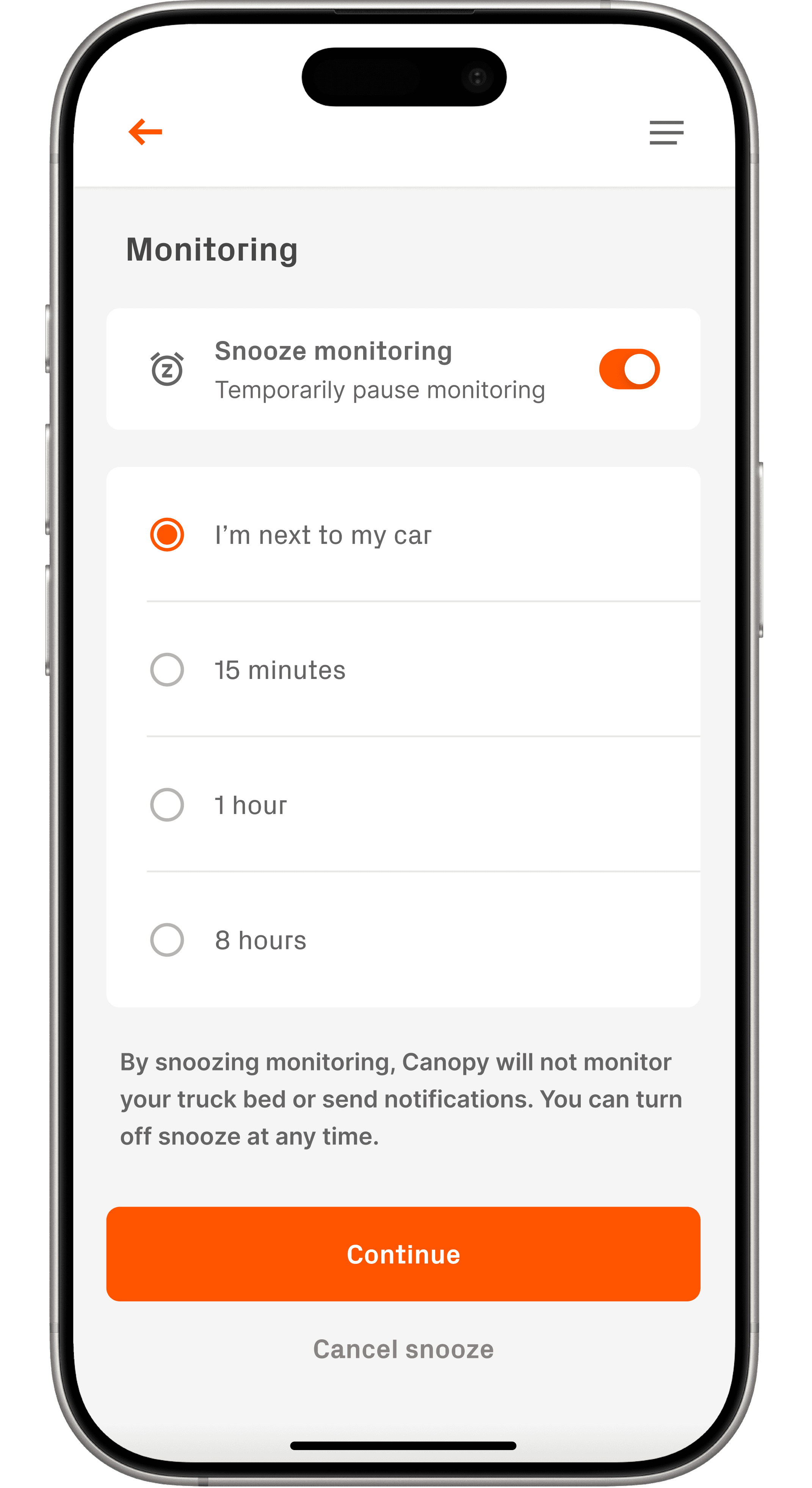
The final Snooze Monitoring feature lives inside the device's Monitoring menu — accessible from the device page. Users toggle snooze on, choose a context (near their car) or a duration (15 minutes, 1 hour, 8 hours), and confirm. That's it. Canopy pauses monitoring, stops sending notifications, and resumes automatically when the snooze period ends.
The confirmation screen was critical: users needed a moment to verify what they were pausing before committing. And once snoozed, the device page surfaces a clear "Snoozing until user resumes" indicator so there's never any ambiguity about the system's current state — a direct fix for the gap Prototype #5 exposed.
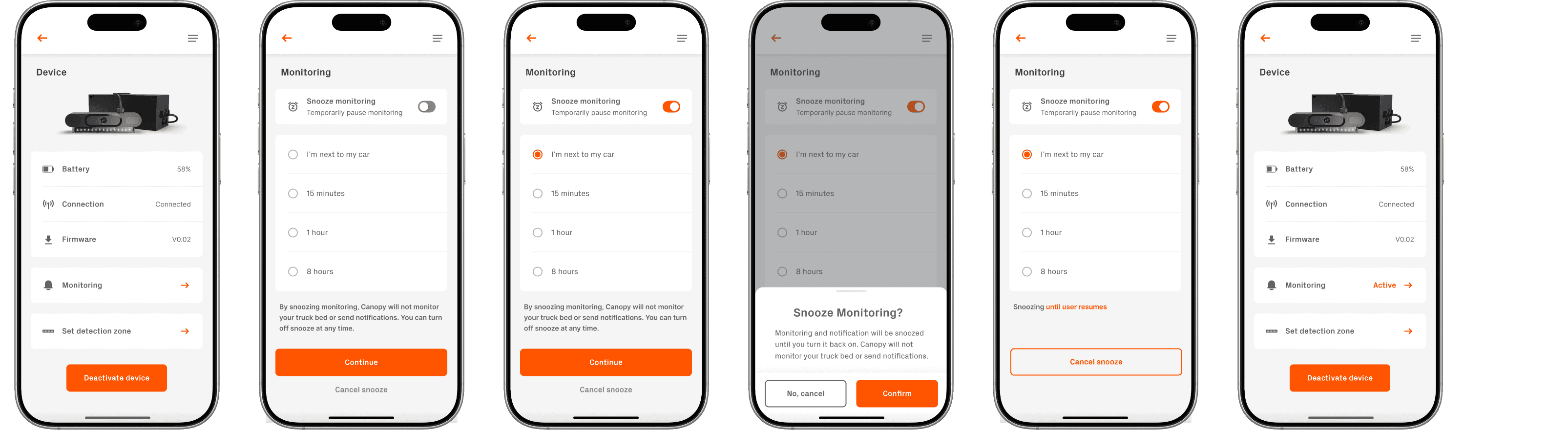
The full snooze monitoring flow: device page → monitoring menu → duration selection → confirmation → active snooze state with clear resume indicator.
Key Design Decisions
Three calls that shaped the final product.
01
Activity-based presets over time-only options
I could have shipped a simple timer. Instead I added contextual presets — 'I'm next to my car' — because users think in terms of what they're doing, not how many minutes they want. That said, I intentionally cut the 'I'm at work' preset. Work hours vary too much across users, and an ambiguous resume time would create more anxiety than it solved. Flexible time-based options gave users clarity without over-engineering.
02
A confirmation step before snooze activates
There was a temptation to make snooze a one-tap action with no friction. I pushed back. Pausing a security system is a deliberate decision — it deserves a moment of intentionality. The confirmation screen adds one step but removes a lot of regret. Post-launch, we saw virtually no support tickets from users accidentally snoozing and missing real events.
03
Visible snooze state on the device page
The monitoring menu is great, but users don't open it every session. I surfaced the active snooze status — 'Snoozing until user resumes' — directly on the device page so it's impossible to forget the system is paused. Without it, three of eight usability test participants said they'd have no idea if monitoring was on or off.
Outcomes
Numbers that actually moved.
4.8/5
Average satisfaction score across 50 post-launch survey respondents
22%
Reduction in notification opt-outs post-launch
35%
Decrease in false alert complaints
18%
Increase in engagement with device and notification settings
Reflection
What I'd do differently.
I intentionally scoped out zone-by-zone snoozing for the MVP — the ability to pause monitoring on one device but not another. The engineering lift was real, and I didn't want to slow down the launch. But in retrospect, users with multiple Canopy devices would have benefited from that granularity, and it's the first thing I'd prioritize in a v2.
I'd also want more post-launch data on how users are actually choosing between the activity-based and time-based presets. Knowing whether "I'm next to my car" is being used meaningfully or just because it's the first option would meaningfully change how I'd sequence those choices in a redesign. That's the kind of behavioral data that only comes from shipping.
Next Steps
Snooze was a bridge. The destination is smarter monitoring.
Snooze Monitoring was always a manual solution to a problem Canopy's AI models were already working toward solving automatically. As those models improve — better distinguishing real threats from expected activity — the need to manually snooze should diminish. The more interesting design question becomes: how do you transition users from a feature they rely on today to a system that no longer needs it? That handoff moment is worth designing deliberately.
01
Multi-device snooze
Zone-by-zone snooze was deliberately scoped out of the MVP. With usage data now available, the case for per-device snooze controls is stronger — especially for users with multiple Canopy devices covering a driveway and a garage simultaneously.
02
Behavioural snooze analytics
Which presets are users actually choosing? If 'I'm next to my car' is selected overwhelmingly over time-based options, the UI hierarchy should reflect that. If time-based options dominate, the contextual presets may need rethinking. This data exists post-launch and should be driving the v2 decision.
03
Designing the AI handoff
As Canopy's AI models get better at identifying expected activity, snooze becomes less necessary. The design challenge is surfacing that improvement to users in a way that builds trust — not just removing a feature they've come to rely on. What does 'your AI now handles this automatically' look like as a user experience?