Canopy Security · UX Design & Research
Giving Users Control Over Their Own Data
What happens when users can't delete their own account on a security app without calling support? You find out fast.
Role
Product Designer & Researcher
Platform
iOS & Android
Timeline
~6 weeks
Tools
Figma, LogRocket, Zendesk, Google Meet
The Problem
Users couldn't delete their own account. On a security app. Let that sink in.
Canopy is a vehicle security app. Users trust it with their vehicle, their location data, and their personal information. So when I discovered that deleting your account meant emailing support and waiting up to a week for manual confirmation, I knew we had a trust problem on our hands — not just a UX problem.
For a product built on the premise of safety and control, asking users to surrender control of something as basic as account deletion was doing serious damage. Account-related issues were generating roughly 15% of all incoming support tickets, and App Store reviews were calling out the lack of a deletion path by name. Users weren't confused. They were frustrated.
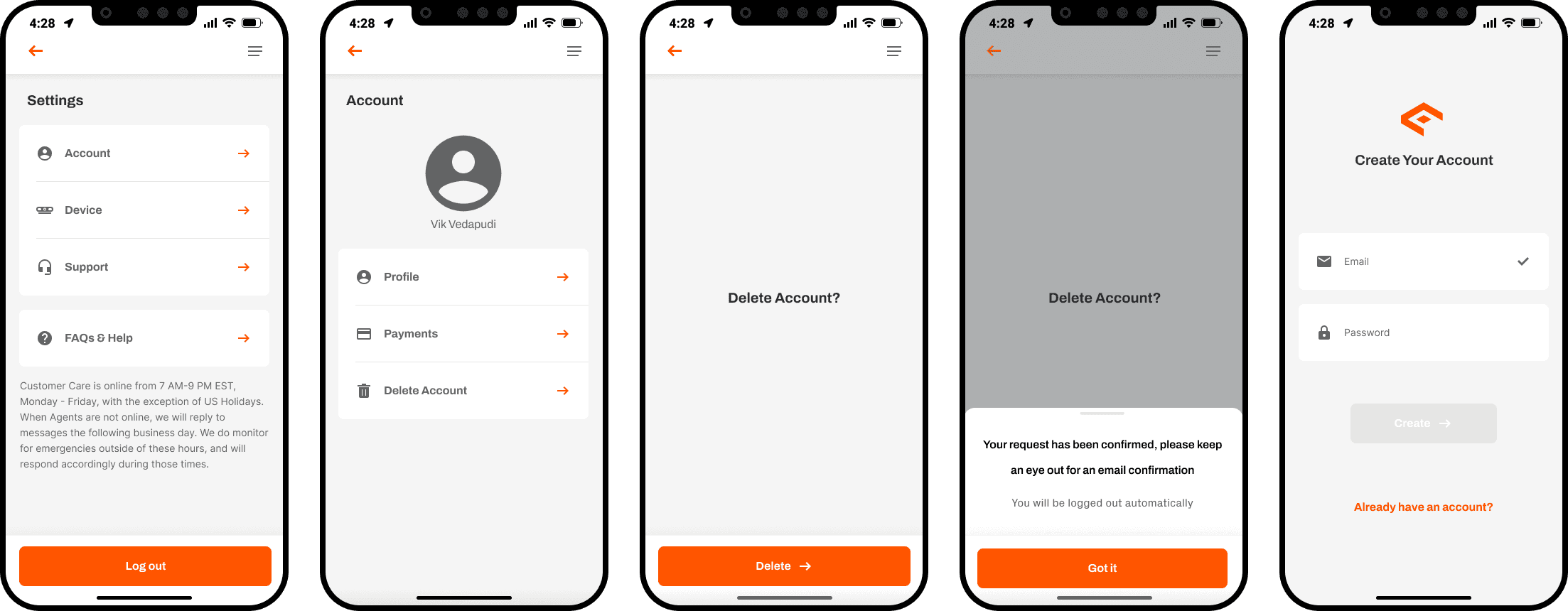
The original deletion flow. Users could find the path, but it ended with 'keep an eye out for an email confirmation' - no immediate action, no clarity on what gets deleted, no sense of control.
Discovery
I didn't have to look hard. Users were already telling me.
Before touching Figma, I reviewed Zendesk support tickets, watched LogRocket session recordings, and conducted 8 user interviews over Google Meet with people who had recently tried and failed to delete their account. Three clusters emerged consistently: trust, control, and anxiety.
Research Question
How might we let users delete their accounts while giving them full ownership over their data and maintaining trust in our security product?
Artifact 01 — Research synthesis
Affinity map — 8 user interviews + Zendesk review
Key Insights
Three things users needed that I wasn't giving them.
01
Ownership over their data
Users felt like Canopy owned their data, not them. Deletion being gated behind a support email reinforced that feeling. They needed an in-app path that made them feel like the data was theirs to control.
This meant the flow had to live entirely inside the app. No external emails, no support tickets, no waiting.
02
Immediate deletion
Waiting days for account deletion via support felt outdated and disrespectful. Users wanted to pull the trigger themselves, on their own timeline.
That meant no recovery windows, no deferred processing. The moment a user confirmed, the account was gone.
03
Data transparency
Users were anxious about what happens to their data when they delete. They needed a clear, honest breakdown of what stays and what goes, with no ambiguity.
Generic reassurance wasn't enough. The design had to name exactly what gets erased, line by line.
The Reframe
I thought it was a UX problem. It was actually a trust problem.
Early on, I framed this as a friction problem — reduce the steps, speed up the process. But the research kept pointing somewhere else. The issue wasn't how long deletion took. It was that users had no agency over it at all. Every time a user had to contact a human to delete their account, they were implicitly being told: "You don't fully own this experience."
That reframe changed what I was designing. A friction problem asks: how do I reduce steps? A trust problem asks: does this experience make users feel in control? Those lead to very different solutions. It's why I added the data transparency screen rather than just shortening the flow. It's why the reason-selection step exists at all. Every decision ran through the same filter: does this give control back to the user?
Design Iteration
From emailing support to immediate in-app deletion.
The path to the final design wasn't straight. It started with formally documenting the problem, moved through an iteration that was technically correct but emotionally wrong, and landed on a solution that came directly from user feedback.
Artifact 02 — Design iteration
From email support to immediate in-app deletion.
Original state: email support to delete
BrokenThe original deletion process required users to email Canopy support and wait several days for manual processing. No in-app path existed at all. Users had no visibility into the status of their request and no confirmation of what would happen to their data.
PRD: defining the problem before designing the solution
Product ownershipBefore touching Figma, I wrote a Product Requirements Document outlining the problem, what users needed, the proposed solution, and how I planned to achieve it. This wasn't a design deliverable. It was a product decision. Writing the PRD forced precision on scope, surfaced engineering constraints early, and gave stakeholders a document to align on before any visual work began.
First deletion flow: no reason-selection step
RevisedMy first designed version went straight from the delete trigger to the data transparency screen. Clean, minimal, fast. But informal feedback from a colleague surfaced a problem: it felt abrupt, like the app was rushing them out the door.
Final flow: reason-selection added as pacing mechanism
ShippedAdding the reason-selection step wasn't just about gathering product data. It was about giving users a moment to feel heard before the point of no return. The step also serves as a natural pause that reduces accidental deletions without adding bureaucracy. A critique became a better product decision.
Artifact 02b — Product Requirements Document
PRD summary — Account deletion feature
Problem statement
Canopy users cannot delete their own accounts from within the app. The only path is to email support and wait up to 7 days. This creates significant trust damage for a product whose entire value proposition is security and user control.
User needs
Users need to delete their account immediately, without contacting support. They need to know exactly what data gets deleted. They need confirmation that the deletion has actually happened.
Proposed solution
An in-app deletion flow accessible from Settings, with a reason-selection step, an explicit data transparency screen, and immediate confirmation. No waiting period. No support contact required.
Success metrics
22% reduction in deletion-related support tickets. Deletion flow completion rate above 85%. Zero support escalations from users who cannot find the deletion path.
Out of scope
Account recovery after deletion. Zone-by-zone data deletion. Third-party data deletion requests. These are v2 considerations after the core flow ships.
Engineering dependencies
Immediate account termination endpoint. Data purge confirmation from backend. Device unpairing triggered on deletion. All scoped and reviewed with engineering lead before design began.
The Solution
If you want to leave, you should be able to leave. Immediately.
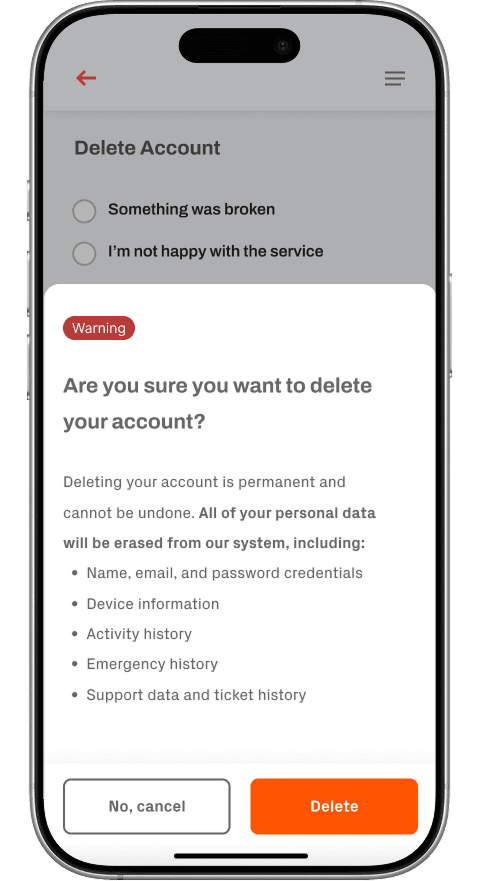
Deletion is an act of distrust. My job was to make the moment feel resolved rather than punitive. Users wondering what happens to their data, whether it's permanent, whether they'll regret it — the worst thing the design could do was mirror that anxiety back at them.
The flow lives in Settings, Account, then Delete Account. A reason-selection step gives users a natural moment to feel heard. An explicit data transparency screen names exactly what gets erased. A final confirmation triggers immediate deletion — no waiting, no emailing support, no limbo.
Artifact 03 — Flow comparison
Account deletion: before and after
Before: email to support
After: in-app, immediate, transparent
Artifact 04 — Content design
Getting the copy right on the data transparency screen
"Your data will be permanently removed."
Generic and cold. Sounds like legal boilerplate. Gives the user no actual information and signals the app isn't taking the moment seriously.
"The following information will be deleted from our systems."
Slightly better but still corporate. 'Our systems' creates distance. The user doesn't care about your systems — they care about their data.
"Here's exactly what will be deleted: • Your name and email • Device info and pairing history • Activity and alert history • Emergency contacts • Support history This cannot be undone."
Specific, honest, and in plain language. Naming the items shifts the feeling from 'this app is vague' to 'this app is accountable.' The final line is direct without being threatening.
Artifact 05 — Emotional arc
What the user is feeling at each step and how the design responds
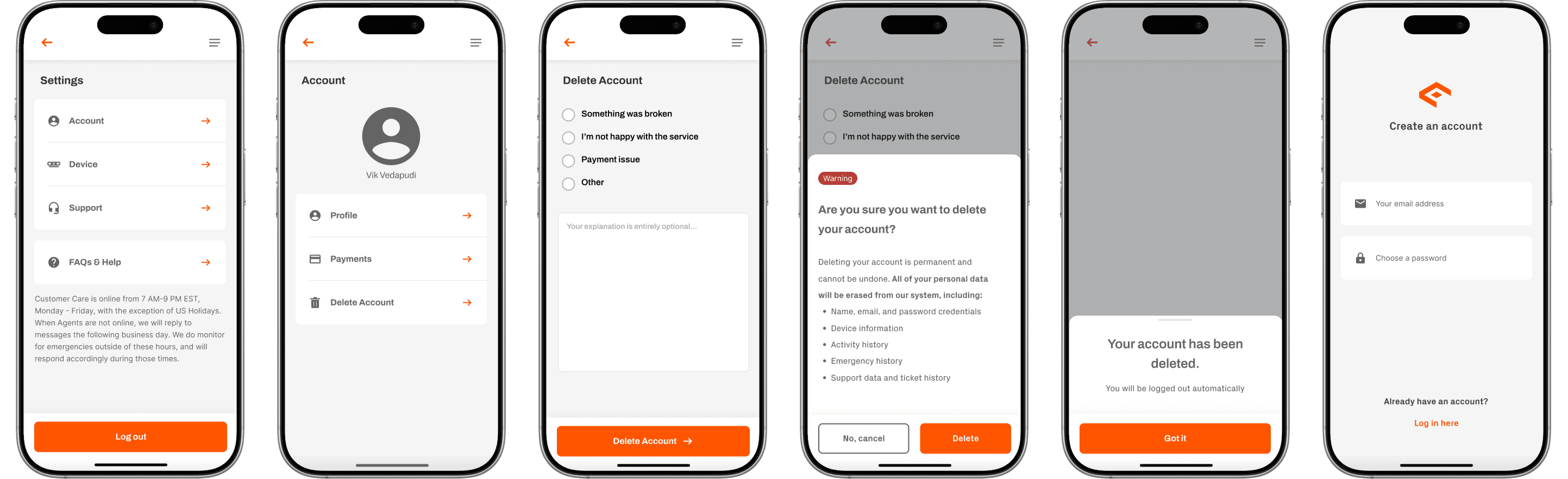
The full account deletion flow: from Settings to confirmed deletion. Transparent, immediate, respectful.
Key Design Decisions
Three calls that shaped the final product.
Artifact 06 — Decision matrix
Key tradeoff evaluations
| Decision | Option considered | Risk raised | Counter-argument | Outcome |
|---|---|---|---|---|
| Immediate deletion vs. 30-day recovery window | Add 30-day soft-delete with recovery (Product preference) | Irreversibility risk User deletes accidentally with no recovery path. | Users who want to delete don't want a safety net they didn't ask for. The reason-selection step and confirmation screen already provide sufficient pause. A 30-day limbo undermines the sense of control the design is trying to restore. | Immediate |
| Reason-selection step: include or skip | Skip it — cleaner, fewer steps (initial design preference) | Emotional risk Without a pause, deletion feels abrupt and impersonal. Users may feel dismissed rather than respected. | The step adds one screen but changes the entire emotional tone. It makes the moment feel acknowledged rather than processed. It also provides product signal on why users are leaving — a genuine secondary benefit. | Included |
01
Explicit data transparency over vague reassurance
I could have gone with a generic 'Your data will be deleted' message. Instead I built a full itemized list: name, email, device info, activity history, emergency history, support data. It added a screen but massively reduced anxiety. Users who know exactly what's happening feel in control. Users who don't, don't.
02
Immediate deletion, not deferred deletion
There was a product debate about adding a 30-day account recovery window. My pushback: users who want to delete don't want a safety net they didn't ask for. They want the decision respected. The data backs this up: deletion-related support tickets dropped 22% post-launch.
03
Reason-selection as pacing, not just data collection
The reason-selection step wasn't just about gathering product signal. It was about giving users a moment to feel heard before the point of no return. That distinction matters. If users perceive the step as data extraction rather than empathy, it backfires. Copy and framing did the heavy lifting — the options are respectful, not guilt-inducing.
Outcomes
Numbers that actually moved.
22%
Decrease in account deletion support tickets post-launch
15%
Of total support volume resolved by removing the deletion bottleneck
5 → 4
Steps to delete an account, from email-to-support to in-app flow
Reflection
What I'd do differently.
My first version of the deletion flow had no reason-selection step. It went straight from the delete trigger to the data transparency screen. In feedback with a colleague, the reaction was clear: it felt abrupt, like the app was rushing them out the door. I'd been so focused on reducing steps that I designed against the emotional goal. Deletion isn't just a technical action. It's a moment that needs space. The reason-selection step wasn't just about gathering product data. It was about letting users feel heard. A critique turned into a better product decision, but I should have been thinking about pacing from the start.
I'd also want to run a post-launch usability study on the data transparency screen specifically. The metrics were positive, but I'm still curious whether users actually read that itemized list or scroll past it. If they're skipping it, the design isn't doing the emotional work it's supposed to do. And I'd instrument the reason-selection step more formally — the data exists post-launch but I'd want a proper dashboard tracking deletion reasons over time to surface product problems before they show up in support tickets.
Next Steps
What a v2 of this feature would look like.
The v1 focused on getting users out the door cleanly and transparently. A v2 would shift focus from departure mechanics to user protection — giving people meaningful control over what their data is worth, not just what gets deleted.
01
Data export before deletion
Users deleting a vehicle security account may be doing so after an incident — a break-in, a theft, a police report. Letting users download a record of their activity history, alert log, and emergency events before account deletion would give them something genuinely useful in those moments. A security app that helps you after something goes wrong, not just while monitoring, is a more trustworthy product.
02
Confirmation email as a final layer
Sending a confirmation email outlining exactly what was deleted, what data belonged to the user, and what the timeline of deletion looks like would close the loop in a way the in-app flow can't. It creates a paper trail, reinforces transparency, and gives users something to reference if they have questions later.
03
Post-deletion reason analysis
The reason-selection step was designed partly to collect product signal. A v2 would close the loop on that data by building a dashboard for the product team tracking deletion reasons over time. Spikes in specific reasons are early indicators of product problems that wouldn't surface in support tickets until much later.